


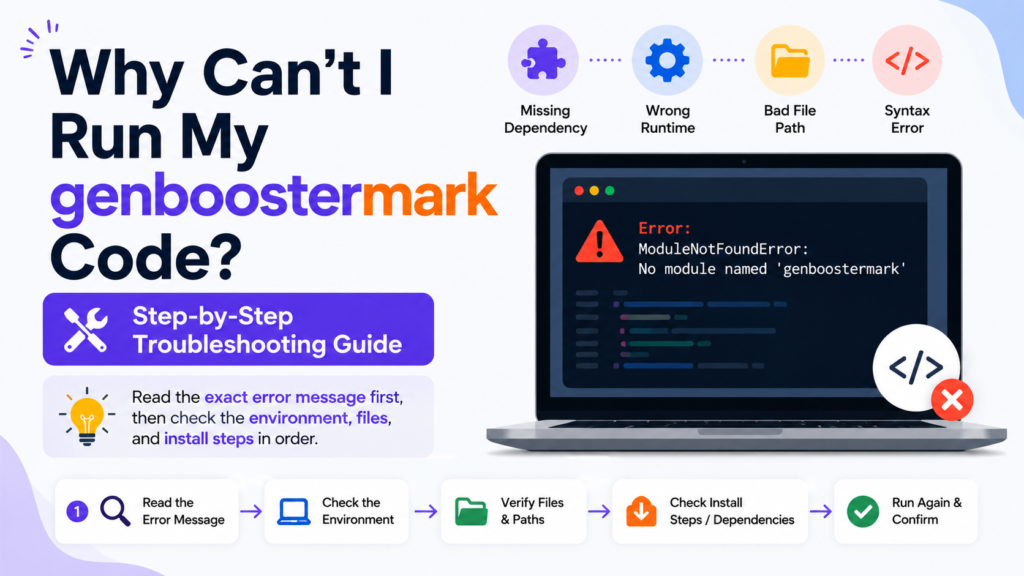
Your code usually fails because of a missing dependency, wrong runtime, bad file path, or a syntax error in the project. The fastest fix is to read the exact error message first, then check the environment, files, and install steps in order.
Check the exact error first
Do not guess. Read the full error message from the terminal, editor, or log file. Error output often includes the real cause, the file name, and the line number. In Python, traceback output is designed to show the stack of calls that led to the failure, and syntax errors are shown with location details in the traceback. That makes the error text the best place to start.
If the message says a module cannot be found, the problem is often not the code itself. In Node.js, the runtime throws a MODULE_NOT_FOUND error when it cannot resolve a module. That usually points to a missing package, a wrong import path, or an install step that did not finish correctly.
If you are working with structured project setups, you may also want to check Code Lovelolablog, which explains common coding patterns and setup issues in simple terms.
Confirm that you are running the right file
A very common problem is running the wrong file from the wrong folder. Check the file name, the command you typed, and the current working directory. Relative paths depend on where the command starts, so the same command can work in one folder and fail in another.
Also check whether the project uses a main entry file, a build output file, or a script command in the project metadata. In Node.js projects, the package is defined by the package.json file, which helps determine how the project should be run. If the wrong entry point is used, the code may fail even when the source files are correct.
Verify the runtime and version
Code often fails when the installed runtime does not match the version expected by the project. This happens with Python, Node.js, .NET, and other platforms. Check the version you have installed and compare it with the version the project needs. A mismatch can break syntax, imports, build tools, or dependencies.
This step matters even more when the project uses newer language features. A script that works on one machine may fail on another machine with an older runtime. Version differences can change module loading, environment handling, and exception behavior.
Reinstall dependencies cleanly
If the code depends on external packages, reinstall them in a clean way. Remove broken installs, then run the package manager again. Many project failures come from incomplete installs, corrupted lock files, or a missing dependency folder. In JavaScript projects, dependencies are usually recorded in package.json, and missing modules trigger module resolution errors when the runtime cannot find them.
For Python projects, a similar problem can happen when the wrong environment is active or when packages were installed outside the intended environment. For .NET projects, runtime and SDK settings can also affect what the app can load and run. The main goal is simple. Make sure the project is using the packages it expects in the place it expects them.
For Python users facing unusual runtime failures, the guide on How to Fix Dowsstrike2045 Python Code helps explain deeper debugging steps for script errors and module issues.
Check environment variables and configuration
Many programs do not run because a required setting is missing. This can include API keys, database URLs, path settings, feature flags, or build configuration values. Environment variables are stored in the process environment, and they can differ from one machine, shell, or user account to another.
That is why a codebase can run in one place and fail in another place with the same source code. The app may be reading a value that is not set in the current session. Check the variable names carefully. Also confirm that the values are available to the process that starts the code, not only to your general login session.
Use this simple troubleshooting table
| Symptom | Most likely cause | What to check first |
|---|---|---|
| Code does not start | Wrong command, wrong file, wrong folder | Entry file, working directory, run command |
| Module not found | Missing dependency or wrong import path | Install step, import path, package name |
| Syntax error | Typo or unsupported language feature | Line number, brackets, quotes, indentation |
| App starts but stops early | Missing config value or environment variable | .env file, secret name, shell settings |
| Works on one machine only | Runtime or version mismatch | Language version, package version, build tools |
| Unexpected crash | Exception or bad input data | Full traceback, input file, recent changes |
The table above covers the most common failure patterns. It helps narrow the problem before you change too many things at once. Reading the error and matching it to the symptom is usually faster than trial and error.
Fix import and path problems
If the code imports another file, library, or module, check the name and location of that import. A small typo can stop the whole run. In Node.js, the runtime looks up modules using its own resolution rules, and when it cannot find one, it raises MODULE_NOT_FOUND. In Python, the traceback gives you the exact point where the exception was raised.
Also check relative file paths. A path that works from one directory may fail from another because relative paths depend on the current working directory. This is a common reason for file not found errors, config read failures, and broken asset loading.
Check syntax carefully
If the code does not even begin to run, syntax is a strong suspect. Look for missing commas, unmatched quotes, missing closing brackets, wrong indentation, or unsupported syntax for your current runtime version. Syntax errors often appear early in the traceback or error output, and the message usually points to the exact line that needs attention.
When the code is large, test a small section at a time. Remove extra logic and verify the simplest possible version first. Then add the remaining pieces back one by one. That makes it easier to see which line caused the failure.
Look for hidden permission issues
Sometimes the code is correct, but the process cannot read a file, write a file, or access a folder. Permission problems often show up when a script tries to use logs, uploads, local databases, or build outputs. In Windows and similar systems, environment and process settings can differ between users and sessions, which can also affect access and configuration.
Check whether the file is locked, whether the folder exists, and whether the process has rights to use the location. This matters most for scripts that create files, update caches, or write temporary data.
Run the smallest possible test
If the full project still fails, strip it down. Run only the main file. Then run only the import. Then run only the part that loads configuration. After that, add one feature at a time. This step makes the failure easier to isolate and reduces the chance that you are fixing the wrong layer.
A small test also helps separate code errors from environment errors. If the tiny version works, the problem is likely in a later step such as dependency loading, configuration, or input data. If the tiny version fails, the issue is probably in the runtime, syntax, or setup.
Common checks before you stop
Run through these points in order:
- Read the full error text and the traceback.
- Confirm the correct file and folder.
- Verify the runtime version.
- Reinstall dependencies cleanly.
- Check environment variables and config values.
- Review import paths and file paths.
- Test the smallest possible version of the code.
What to inspect in the error log
When the code fails, the log usually gives clues in a few fixed places. Look for the file name, line number, exception type, and the final line of the traceback. Python tracebacks are designed to show the chain of exceptions and the exact point where the error surfaced. That same habit of reading from the bottom up also works well in many other runtimes.
If the message includes a missing module, missing file, or undefined value, focus on setup first. If the message includes a syntax problem, focus on the code line itself. If the message appears only after startup, focus on config, environment variables, or runtime mismatches.
Safe way to narrow the cause
Change one thing at a time. Do not edit code, reinstall packages, and change configuration all at once. That makes it impossible to know what actually fixed the problem. Keep a record of each change and test after every step. This is the cleanest way to isolate a run failure without wasting time.
When the code still refuses to run after these checks, the remaining cause is usually in the project’s build process, deployment setup, or runtime dependency chain. At that point, the most useful evidence is the exact error text, the command you used, the runtime version, and the list of installed packages.


