



A slow PC can turn even simple tasks into a frustrating experience. Long boot times, laggy apps, and unresponsive systems are often caused by cluttered startup processes, junk files, and hidden system errors.
The good news is that you don’t need advanced technical skills to fix it. With Advanced SystemCare, you can clean, optimize, and accelerate your system efficiently.
Part 1: What is Advanced SystemCare?

Advanced SystemCare is a comprehensive PC cleaner developed by IObit. It combines system cleaning, startup management, registry repair, and real-time performance acceleration into one platform.
Its AI Mode automatically detects performance issues and applies fixes, making it ideal for users who want a faster PC without manual tweaking. From removing junk files to optimizing system resources, it delivers a complete performance solution.
Part 2: Key Features That Make Your PC Faster
1. Startup Optimization at the Core
One of the biggest causes of slow PCs is overloaded startup programs. Many applications quietly add themselves to your startup, consuming resources before you even begin using your computer.
Advanced SystemCare includes a powerful Startup Manager that:
- Detects unnecessary startup programs
- Identifies high-impact boot items
- Allows one-click disabling of non-essential services
By reducing startup load, your PC can boot significantly faster—often cutting boot time from minutes to seconds.
2. Deep System Cleanup for Faster Performance
System clutter is another major reason for slow performance. Over time, your PC accumulates temporary files, cache data, leftover installation files, and invalid shortcuts.
Advanced SystemCare performs deep cleaning by:
- Removing junk and temporary files
- Deleting obsolete system data
- Clearing invalid shortcuts and useless logs
With less data to process, your system not only boots faster but also runs more smoothly throughout daily use.
3. Registry Repair for Stability and Speed
The Windows registry plays a crucial role in system startup and operation. As it becomes filled with broken entries and outdated data, it can slow down boot time and reduce system stability.
Advanced SystemCare safely:
- Scans for registry errors
- Repairs invalid or corrupted entries
- Optimizes registry structure for faster access
A cleaner registry helps Windows load essential services more efficiently, resulting in a faster and more stable system.
4. Intelligent Real-Time Speed Up
Beyond cleaning, Advanced SystemCare delivers continuous performance optimization through its real-time performance monitoring.
Its intelligent engine:
- Tracks CPU and RAM usage
- Detects unnecessary background processes
- Automatically frees up system resources
During startup and regular use, this ensures:
- Reduced background interference
- Faster resource allocation
- Smoother overall responsiveness
This means your PC stays fast—not just immediately after cleanup, but over time.
5. One-Click Optimization for Instant Results
For users who prefer simplicity, Advanced SystemCare offers a one-click optimization feature.
With a single click, it can:
- Clean junk files
- Optimize startup items
- Repair registry issues
- Boost overall system speed
This streamlined process makes it perfect for both beginners and advanced users who want quick and effective results
Part 3: How to Speed Up a Slow PC With Advanced SystemCare
Follow these steps to improve your PC performance:
Step 1: Download and install Advanced SystemCare from the official website.
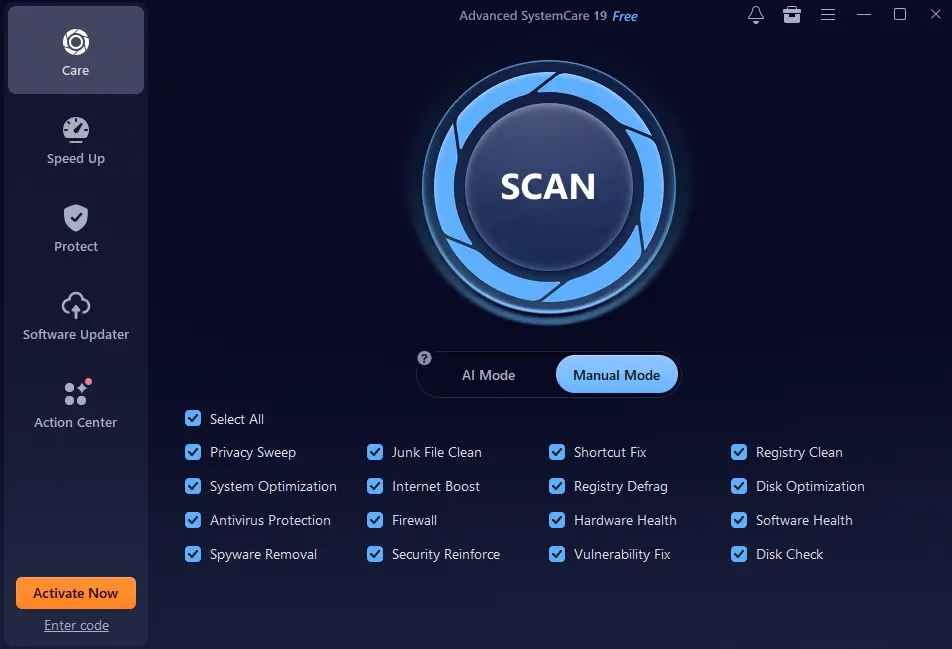
Step 2: Launch the program and select AI Mode for automatic optimization.
Step 3: Click Scan to detect junk files, startup issues, and registry errors.
Step 4: Click Clean & Optimize to fix all detected problems and boost system speed.
Within minutes, your PC will become noticeably faster and more responsive.
Part 4: Additional Features in 2026
In addition to speed and cleaning, Advanced SystemCare includes:
- Software Updater: Keeps programs updated for better performance and security
- Browser Protection: Blocks malicious websites and protects your data
- Privacy Cleaner: Removes browsing traces and protects sensitive information
- Large File Finder: Frees up disk space by identifying unnecessary large files
Final Thoughts
If your PC feels slow or outdated, Advanced SystemCare offers a practical and effective solution. By combining startup optimization, deep cleaning, registry repair, and real-time speed boost, it helps restore your system’s performance with minimal effort.
Whether you want faster boot times or smoother daily performance, this all-in-one tool makes PC optimization simple, fast, and accessible in 2026.


